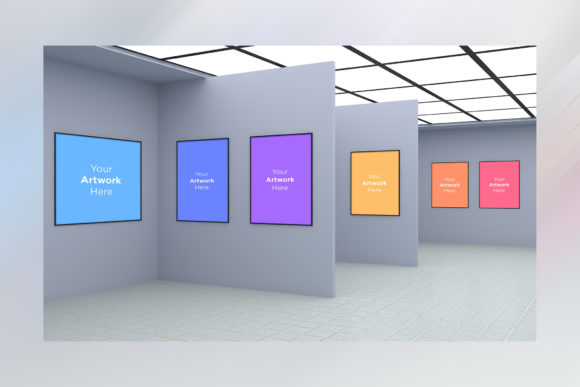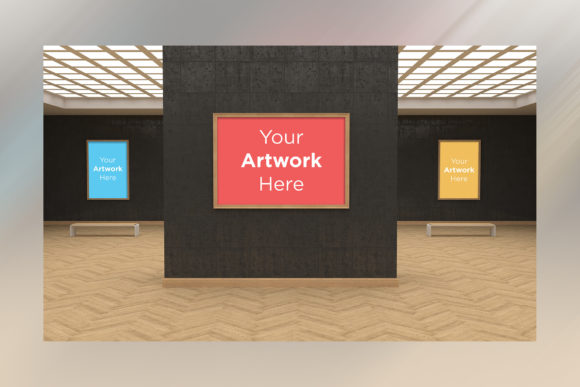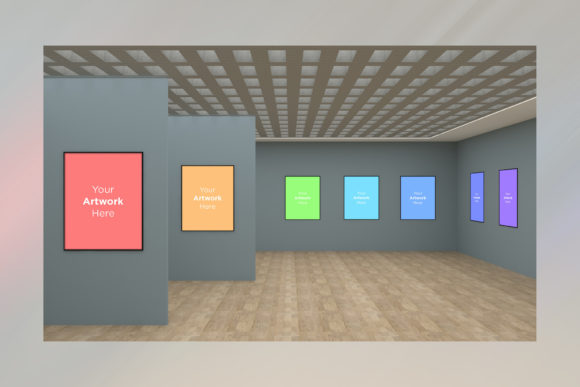
Art Gallery Multi Frames Mockup 3D
Imagine standing in a pristine, sunlit gallery space where your latest artwork is the undeniable focal point. The lighting catches the texture of the canvas, shadows fall softly against the wall, and the composition feels just right. Achieving this level of presentation usually requires booking a studio, hiring a photographer, and spending hours arranging physical frames. However, Art Gallery Multi Frames Mockup 3D bridges the gap between imagination and reality without leaving your desk. This high-resolution digital environment allows you to place calligraphy, patterns, paintings, or photographs into a realistic setting instantly.
This tool is not merely a template; it is a flexible workspace designed for effective presentation. Whether you are showcasing a single piece or a complex multi-scene frame arrangement, the mockup provides a professional backdrop that elevates your work. By utilizing smart object technology within Photoshop, the process becomes intuitive, saving you significant time while delivering a result that looks indistinguishable from a real photograph.
Why Different Audiences Value Realistic Presentation
The value of a high-quality mockup varies depending on who is holding the brush, the camera, or the marketing strategy. For some, it is about artistic integrity; for others, it is a critical business asset. Understanding these different perspectives helps clarify why a tool like this matters across various sectors.
For Beginners and Hobbyists
If you are just starting your creative journey, the barrier to entry can feel daunting. Setting up a photo shoot requires equipment you might not own and technical knowledge you haven't yet mastered. A beginner often prioritizes ease of use and learning value. With this Art Gallery Multi Frames Mockup 3D, the learning curve is minimal. You do not need to understand complex lighting rigs or perspective distortion. By simply opening the PSD file and locating the red-labeled Smart Objects, you can paste your design and see an immediate result. This encourages experimentation without the fear of ruining expensive materials or wasting money on failed photoshoots.
For Professional Creators and Artists
Experienced artists often face tight deadlines and the need for consistent branding. Their primary concern is quality and speed. They cannot afford to wait days for a physical setup. The ability to reuse this mockup many times means they can generate multiple variations of their portfolio or social media content in minutes. The realistic studio lighting and soft shadows ensure that their work is presented with the dignity it deserves, whether they are selling prints online or pitching to a client. The high resolution (5000 x 3000px) guarantees that every detail of their brushwork or ink stroke remains crisp when viewed on large screens.
For Marketers and Small Business Owners
For entrepreneurs and marketers, the mockup serves as a cost-effective solution for commercial value. Creating custom photography for every new product launch is expensive. This tool offers a long-term investment; once purchased, it saves money by eliminating recurring production costs. A small business owner selling framed art can showcase a "multi scene frame" collection without needing a warehouse full of props. They can quickly adapt the background or the frame arrangement to match seasonal trends, ensuring their social media feeds remain fresh and engaging.
For Educators and Bloggers
Educators and content creators need to illustrate concepts clearly. When writing a tutorial on interior design or framing techniques, generic screenshots look unprofessional. Using a realistic gallery space adds authority to their content. It allows them to demonstrate how different styles of art interact with a room's decor. The flexibility of the mockup lets them create visual aids that help students visualize the final outcome of a project before they even begin the physical work.
Navigating the Technical Workflow
The effectiveness of this tool lies in its simplicity. The workflow is designed to be seamless for anyone familiar with graphic editors like Photoshop. The core feature is the Smart Object system. Inside the provided PSD file, layers marked in red indicate where your artwork belongs. This color-coding acts as a visual guide, preventing confusion and ensuring you place your design in the correct orientation.
Once you open the specific Smart Object, you simply paste your image. As soon as you save and close that layer, the main file updates automatically. The software handles the warping, lighting adjustments, and shadow integration. This automation ensures reliability; you don't have to manually tweak curves or blend modes to make your flat image look three-dimensional. The result is a cohesive image where the artwork appears naturally integrated into the gallery space.
Flexibility and Creative Control
While the mockup provides a pre-set environment, it does not restrict creativity. The unique scene is designed to make your artwork stand out, but the high resolution allows for detailed editing if needed. You can use the included JPEG for quick previews or the PSD for further customization. This balance between a ready-made solution and editable depth makes it suitable for both quick social media posts and high-stakes portfolio presentations.
Evaluating Cost and Long-Term Usefulness
In the world of digital assets, the question of value often comes down to return on investment. While creating a mockup from scratch might seem free, the time required to model 3D scenes, light them, and render them correctly translates to hours of labor. By using this Art Gallery Multi Frames Mockup 3D, you are effectively outsourcing that heavy lifting.
- Time Savings: What takes days to set up physically or digitally in 3D software takes seconds here.
- Cost Efficiency: One purchase replaces the need for repeated photography sessions.
- Consistency: Maintain a uniform look across all your projects, which builds brand recognition.
Furthermore, the inclusion of both a PSD and a high-resolution JPEG ensures versatility. You have the source file for future edits and a finished product ready for immediate upload. This dual format supports workflows that range from rapid prototyping to final delivery.
Is This Right for Your Project?
Determining if this tool fits your needs depends on your current goals. If you are struggling to present your work professionally due to budget constraints or lack of equipment, this mockup is an ideal solution. It is particularly useful for those who need to display artwork in a multi scene frame context, allowing viewers to see how pieces relate to one another within a larger installation.
However, if your project requires hyper-specific architectural details that differ significantly from the provided gallery space, you might consider this as a base rather than a final product. For most users, however, the realistic studio lighting and soft shadows provide a neutral yet sophisticated backdrop that complements almost any style of art, from traditional oil paintings to modern digital calligraphy.
Ultimately, the goal is to let the art speak. By removing the distractions of poor lighting or awkward angles, this mockup ensures that the focus remains entirely on your creation. Whether you are a freelancer looking to impress a client, a hobbyist sharing your passion online, or a business owner scaling your brand, the ability to present your work in a stunning, gallery-ready environment is a powerful advantage.