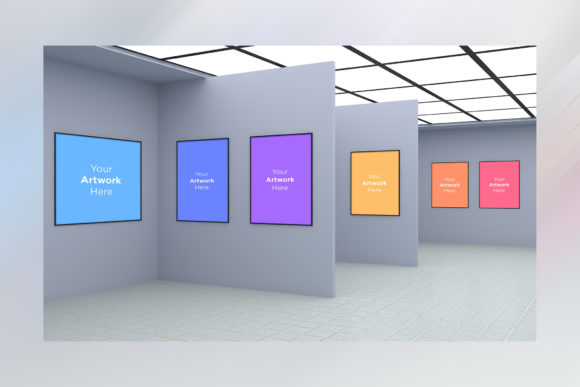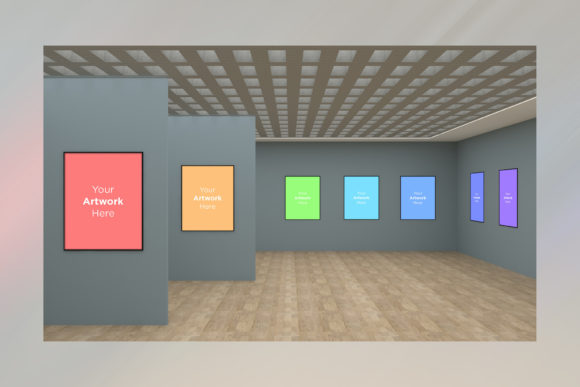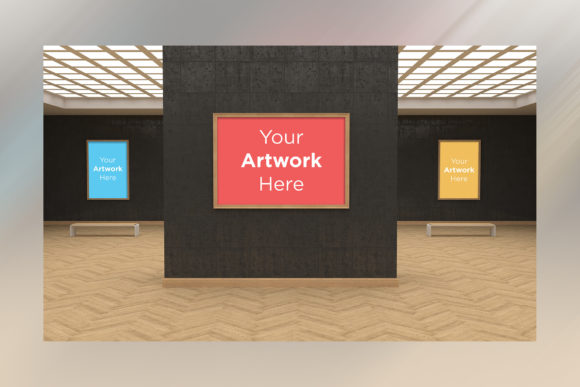
Art Gallery Four Frames Mockup 3D for Creators
Presenting your creative work effectively is often the difference between a casual scroll and a genuine connection with an audience. Whether you are a seasoned photographer, a calligrapher refining your craft, or a small business owner showcasing patterns on social media, the environment in which your art is displayed matters just as much as the art itself. The Art Gallery Four Frames Mockup 3D offers a sophisticated solution to this common challenge. It transforms flat digital files into a realistic, immersive gallery space, allowing you to visualize your designs exactly how they would look hanging on a wall.
This tool is designed specifically for creators who want professional results without the need for expensive photography sessions or complex 3D modeling skills. By providing a high-resolution backdrop with interior elements, it creates a context that elevates simple images into a curated exhibition. The mockup features four distinct frames set within a stylish room, offering a multi-scene presentation that captures attention immediately.
Why Choose This Gallery Space for Your Portfolio
One of the most significant hurdles for independent artists and marketers is establishing credibility. When potential clients or followers see your work presented in a generic white box, it can feel temporary or unfinished. In contrast, placing your artwork within the Art Gallery Four Frames Mockup 3D instantly communicates professionalism. The inclusion of realistic studio lighting and soft shadows adds depth, making the pieces appear tangible and inviting.
The unique scene is crafted to make your artwork stand out. Unlike crowded backgrounds that distract from the subject, this mockup focuses on the frames themselves while maintaining a believable atmosphere. Whether you are displaying bold paintings, delicate calligraphy, or intricate patterns, the neutral yet elegant setting ensures that the colors and details of your design remain the focal point. This is particularly valuable for social media profiles where users scan content quickly; a high-quality mockup stops the scroll.
Simplifying the Design Process
You do not need to be a graphic design expert to utilize this resource. The primary advantage of this mockup lies in its user-friendly setup via smart objects. For those familiar with Adobe Photoshop, the process is intuitive and efficient. You simply open the PSD file and locate the layers highlighted in red, which represent the Smart Objects.
By opening one of these specific Smart Objects, you can paste your own artwork directly onto the canvas. Once you save and close the window, the image automatically wraps around the frame with the correct perspective, lighting, and shadows applied. This eliminates the tedious manual adjustments usually required to fit an image into a 3D environment. It allows you to focus entirely on your creativity rather than technical rendering tasks.
Practical Applications Across Different Industries
The versatility of the Art Gallery Four Frames Mockup 3D makes it suitable for a wide range of professionals and hobbyists. Its ability to display multiple scenes simultaneously opens up numerous possibilities for how you can share your work online.
- Social Media Marketing: Content creators can generate eye-catching posts for Instagram or Pinterest. Instead of posting a single flat image, you can show a collection of works arranged beautifully, driving higher engagement rates.
- Online Portfolios: Freelancers and photographers can use this to showcase their best work on personal websites. A gallery view looks far more impressive than a grid of thumbnails, helping to secure commissions or sales.
- E-Commerce Listings: Sellers of prints, framed art, or digital patterns can use these mockups to demonstrate how a product would look in a real home or office setting, reducing customer hesitation.
- Educational Presentations: Educators teaching art history or design principles can use the mockup to present examples in a visually engaging way during lectures or webinars.
For beginners, this tool removes the barrier of entry. You might have incredible designs but lack the equipment to photograph them properly. This mockup bridges that gap, providing a "studio" experience right from your computer. It saves you money in the long term because you can reuse the same template indefinitely, swapping out different artworks as needed without additional costs.
Technical Specifications and File Quality
Quality is paramount when presenting art digitally. Low-resolution images pixelate on modern screens, ruining the illusion of realism. This mockup addresses that concern by including files in 5000 x 3000 pixels. This high resolution ensures that your presentation looks crisp and sharp, even when viewed on large monitors or printed as marketing materials.
The package includes two main formats to suit your workflow needs:
- A PSD Photoshop format file that enables easy placement of artwork using Smart Objects.
- A JPEG High Resolution file, ready for immediate use in presentations or quick sharing.
Having both options gives you flexibility. You can keep the editable PSD for future updates or client revisions, while the JPEG serves as a lightweight version for email attachments or quick drafts.
Considerations Before You Start
While the Art Gallery Four Frames Mockup 3D is incredibly powerful, there are a few practical things to consider to get the best results. First, ensure your source artwork has sufficient resolution. Even though the mockup itself is high quality, if you upload a tiny, blurry image, the final result will still look poor. Aim for artwork that matches or exceeds the scale of the frames within the scene.
Secondly, think about the color palette of your designs. Since the mockup features realistic lighting and shadows, dark or very light artwork might interact differently with the background. If your art is extremely dark, ensure it doesn't get lost in the shadows; if it is very bright, check that it doesn't blend too much with the lighter parts of the room. Adjusting the brightness or contrast of your original image slightly before pasting it into the Smart Object can help achieve perfect harmony.
Finally, remember that this tool is designed for efficiency. While it saves time compared to creating a scene from scratch, it is important to respect the integrity of the lighting. Avoid adding artificial highlights or shadows that contradict the direction of the existing studio light in the mockup, as this can break the realism.
Maximizing Value for Your Creative Projects
In today's digital landscape, visual storytelling is essential. The Art Gallery Four Frames Mockup 3D provides a streamlined path to achieving that goal. It combines the aesthetic appeal of a physical gallery with the convenience of digital editing. By saving you time and resources, it allows you to invest more energy into creating new art and growing your audience.
Whether you are launching a new brand, updating your portfolio, or simply wanting to share your hobbies with a wider community, this mockup offers a reliable and professional foundation. Its ease of use means that anyone with basic Photoshop knowledge can produce stunning visuals that command respect and attention. Embrace the power of realistic presentation to take your work to the next level.